> ## Documentation Index
> Fetch the complete documentation index at: https://unstructured-53-kapa-ai.mintlify.site/llms.txt
> Use this file to discover all available pages before exploring further.
# Elasticsearch
> This page contains the information to store processed data to an Elasticsearch cluster.
## Prerequisites
* Elasticsearch Local Install or Cloud Service
* Index Name
* Username and Password for Elasticsearch access (if required)
* Cloud ID (if using Elastic Cloud)
* API Key and API Key ID for authentication (if required)
For more information, please refer to [Elasticsearch documentation](https://www.elastic.co/guide/en/elasticsearch/reference/current/index.html).
Ensure that the index schema is compatible with the data you intend to write. If you need guidance on structuring your schema, consult the [Vector Search Sample Mapping](/open-source/ingest/destination-connectors/elasticsearch#vector-search-sample-mapping) for reference.
## Step-by-Step Guide
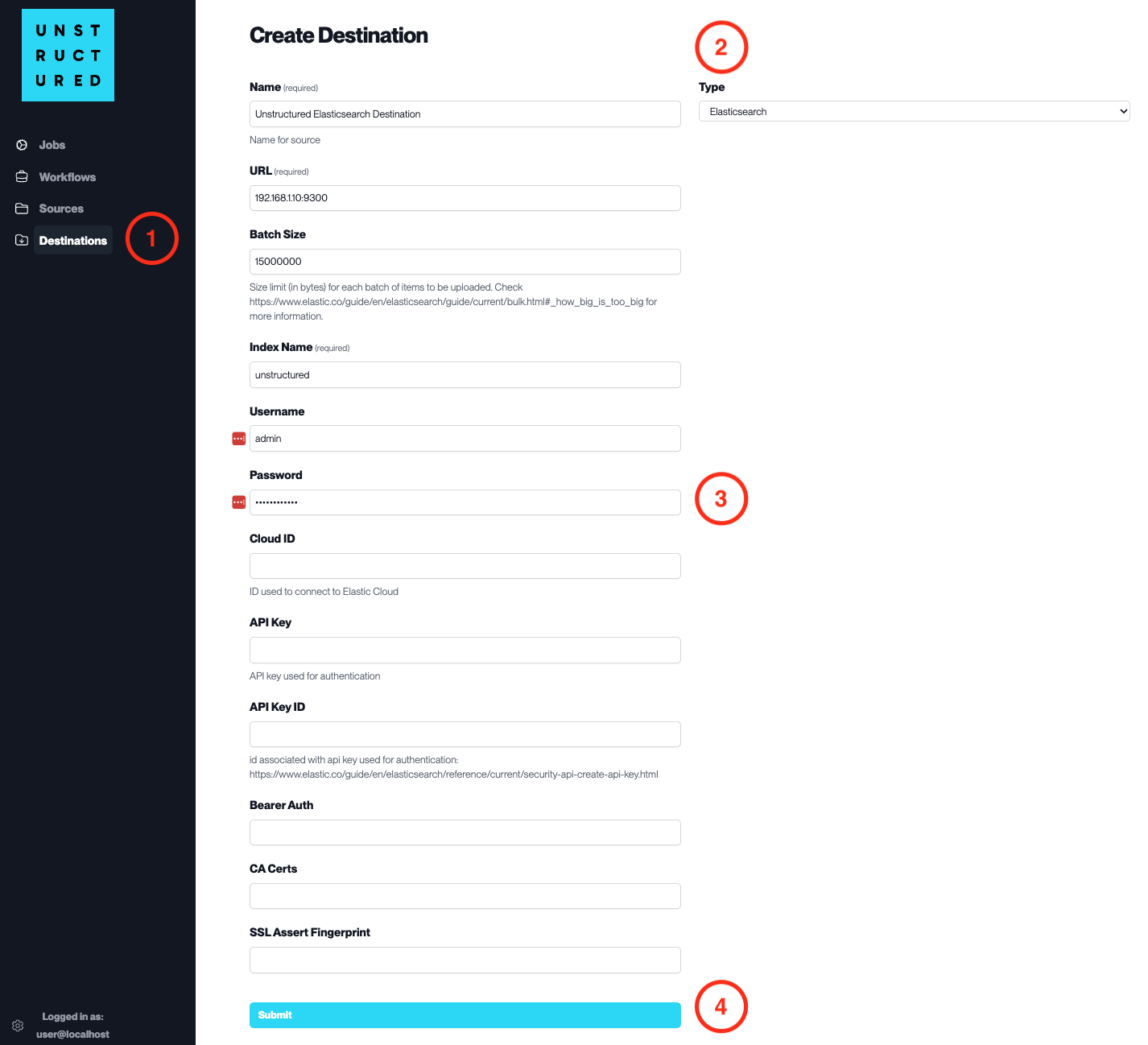
1. **Access the Create Destination Page**. Navigate to the “Destinations” section within the platform’s side navigation menu and click on “New Destination” to initiate the setup of a new destination for your processed data.
2. **Select Destination Type**. Select **Elasticsearch** destination connector from the `Type` dropdown menu.
3. **Configure Destination Details**
* `Name` (*required*): Assign a descriptive name to the new destination connector.
* `URL` (*required*): Enter the URL of the Elasticsearch cluster.
* `Batch Size`: Set the number of documents per batch to be uploaded.
* `Index Name` (*required*): Provide the name of the Elasticsearch index to store the data.
* `Username`: Input the username for the Elasticsearch cluster if authentication is enabled.
* `Password`: Enter the password associated with the username.
* `Cloud ID`: Specify the Cloud ID if connecting to Elastic Cloud.
* `API Key`: Provide the API Key for authentication if this method is used.
* `API Key ID`: Enter the ID associated with the API Key.
* `Bearer Auth`, `CA Certs`, `SSL Assert Fingerprint`: Provide these details if needed for a secure SSL connection.
4. **Submit**. Review all the details entered to ensure accuracy. Click ‘Submit’ to finalize the creation of the Destination Connector. The newly completed Elasticsearch connector will be listed on the Destinations dashboard.