

Library Documentation
Source Connectors Connect to your favorite data storage platforms for an effortless batch processing of your files. Destination Connectors Connect to your favorite data storage platforms to write you ingest results to. Ingest Configuration Each configuration used when generating an ingest process.Features
The Ingest Library/CLI offers the following key features:- Data Ingestion: Facilitates the ingestion of data from various sources, such as databases, APIs, files, or streaming services.
- Partitioning: Efficiently partitions data to extract relevant text data.
- Customization: Allows users to define data sources, ingestion processes, and destination targets.
- Fault Tolerance: Provides mechanisms for handling errors and retries during data ingestion.
- Scalability: Scales horizontally to accommodate large volumes of data.
- Logging: Offers comprehensive logging and monitoring capabilities to track the ingestion process.
Architecture
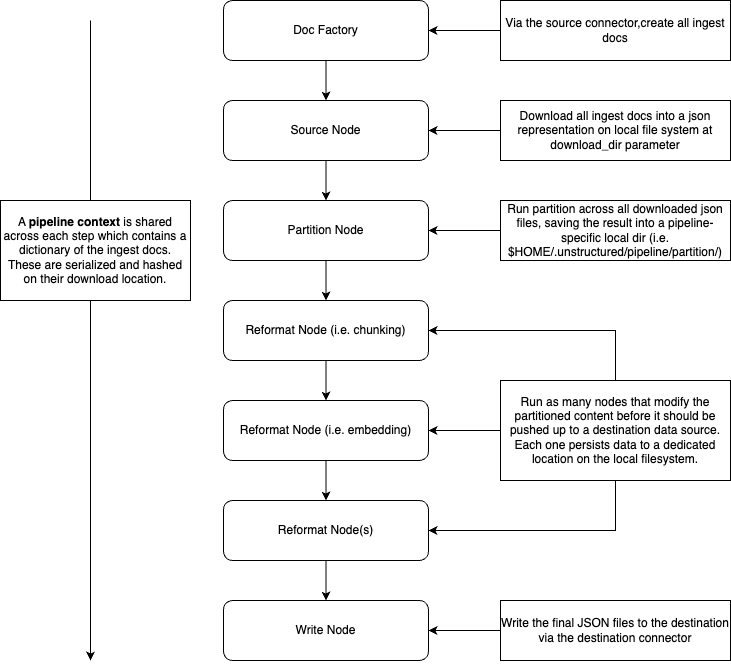
The Ingest Library follows a modular architecture comprising the following components:- Source Connectors: These components are responsible for fetching data from external sources, which can include databases, web services, file systems, or data streams.
-
Partitioning Engine: This component optimally partitions the incoming data into dedicated
Elementsfor processing and distribution. - Reformatters: Optional steps supported to manipulate the partitioned content output, such as chunking and adding embeddings.
- Destination Connectors: These components send the partitioned data to the desired destination, which could be a database, data warehouse, cloud storage, or any other user-defined target.
- The library’s modular architecture provides flexibility and extensibility, allowing users to integrate custom components and adapt the library to their specific needs.
Installation
To install the Ingest Library, follow these steps:-
Run
pip install unstructuredto install the latest version of the unstructured library which include the ingest code and the cli. -
For specific connectors, run
pip install unstructured[CONNECTOR_DEPS]whereCONNECTOR_DEPSreferences the extra dependency label for a particular connector. For example,pip install unstructured[s3]will install the dependencies to interact with the s3 connectors. If these aren’t installed before hand, a convenient error message will be printed for you when you run the ingest CLI for the first time, prompting you with the correct pip command to run. -
Once installed, you can run
unstructured-ingest --helpto get all the available commands.