Prerequisites
- MongoDB Local Install
- Database and Collection
Step-by-Step Guide
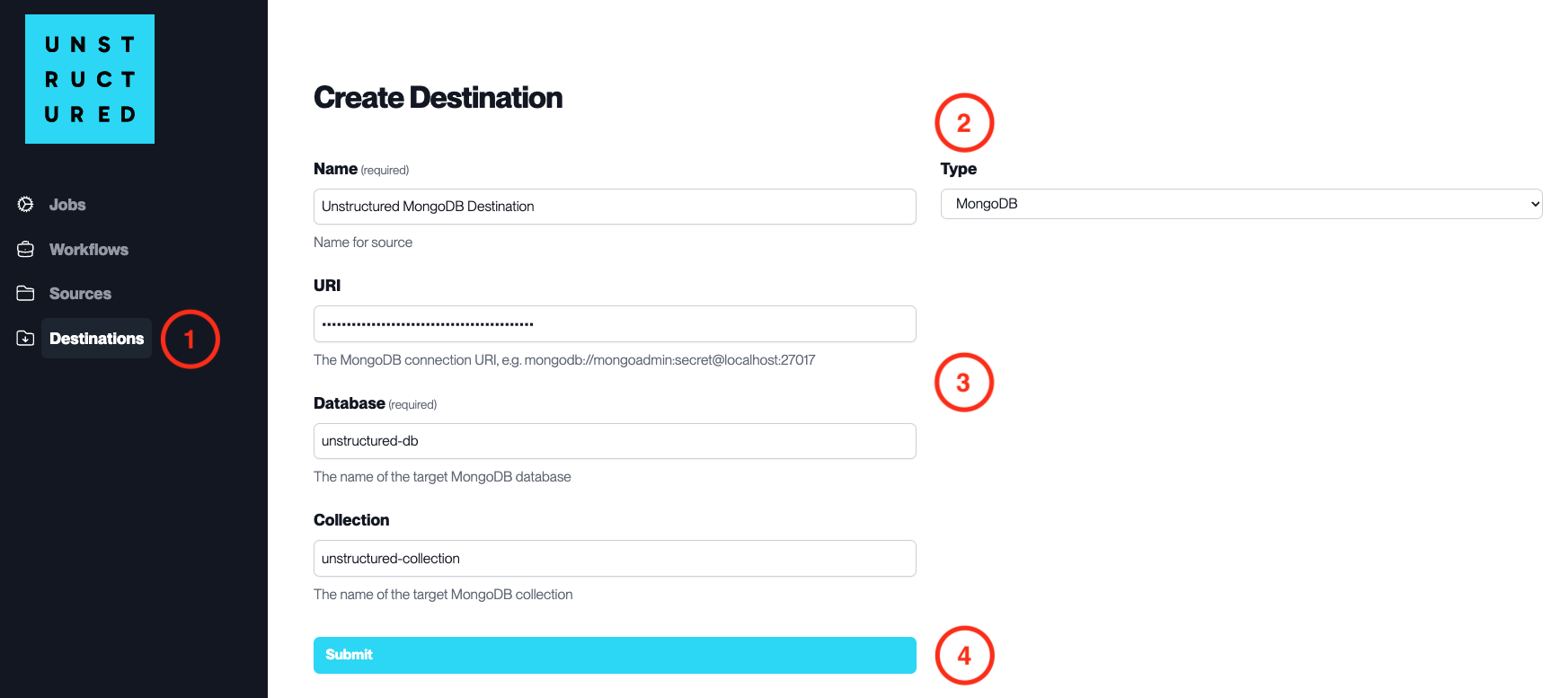
- Access the Create Destination Page. Navigate to the “Destinations” section within the platform’s side navigation menu and click on “New Destination” to initiate the setup of a new destination for your processed data.
-
Select Destination Type. Select MongoDB destination connector from the
Typedropdown menu. - Configure Destination Details
-
Name(required): Assign a descriptive name to the new destination connector. -
URI(required): Enter the MongoDB connection URI. -
Database(required): Provide the name of the target MongoDB database. -
Collection: Specify the name of the target MongoDB collection within the database.
- Submit. Review all the details entered to ensure accuracy. Click ‘Submit’ to finalize the creation of the Destination Connector. The newly completed MongoDB connector will be listed on the Destinations dashboard.