

Prerequisites
- Azure Account
- Azure Blob Storage Container
Step-by-Step Guide
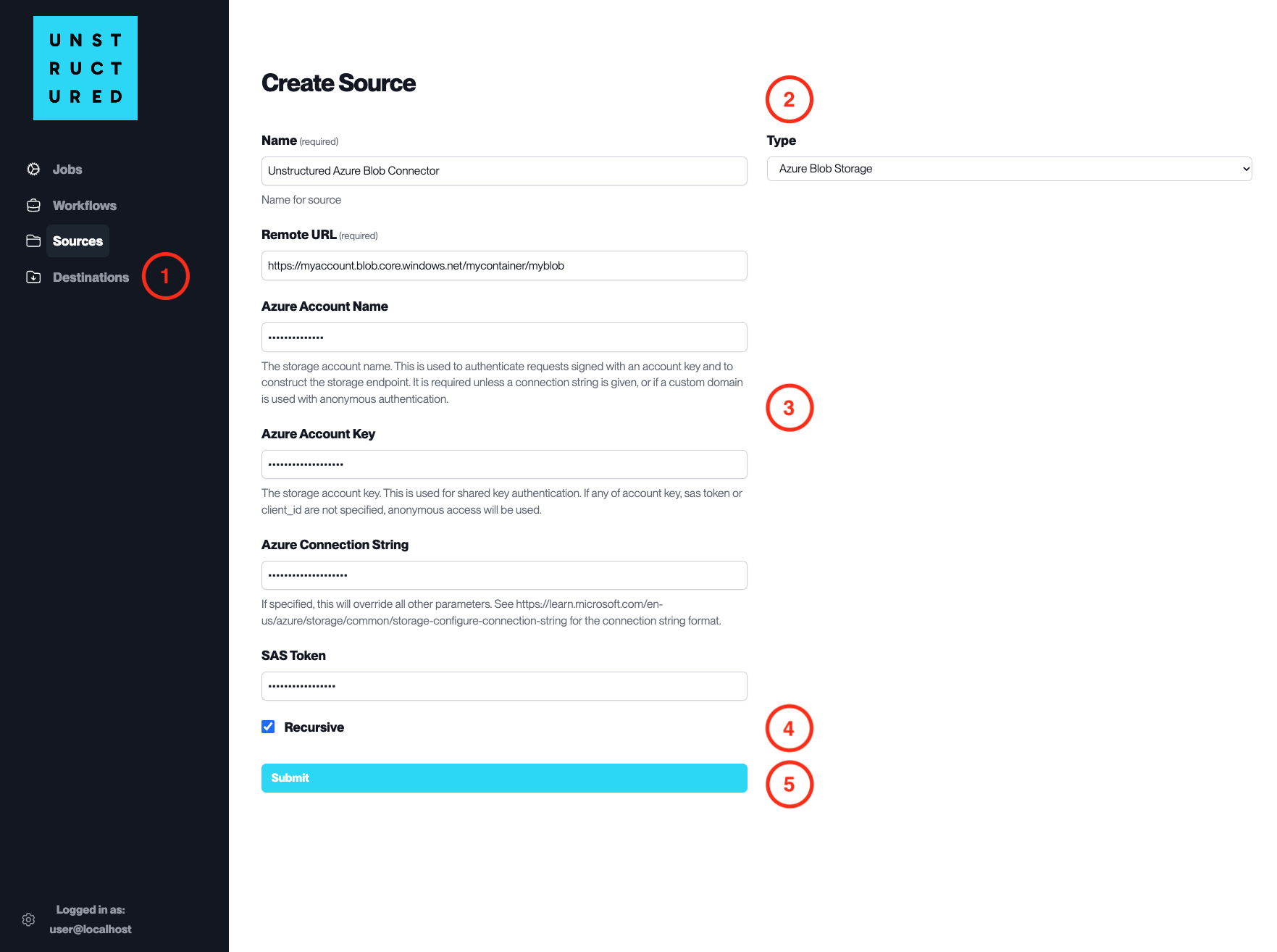
- Access the Create Source Page. Navigate to the “Sources” section on the left sidebar and click the “New Source” button.
-
Select Source Type. Select Azure Blob Storage from the
Typedropdown menu. - Configure Source Details to connect to Azure Blob Storage
-
Name(required): Enter a unique name for the source connector. -
Remote URL(required): Enter the URL that points to the Azure Blob Storage container. -
Azure Account Name(required): Provide the name of your Azure storage account. -
Azure Account Key: Enter your Azure storage account key for authentication. -
Azure Connection String: If applicable, provide the Azure connection string that overrides all other connection parameters. -
SAS Token: If using a shared access signature for authentication, provide the SAS token here.
- Additional Settings
- Check
Recursiveif you want the platform to recursively ingest data from sub-folders within the container.
- Submit. After filling in the necessary information, click ‘Submit’ to create the Source Connector. The newly completed connector will be listed on the Sources dashboard.