

Prerequisites
- AWS Account and API Key
- S3 Bucket
- IAM User with S3 Access
Step-by-Step Guide
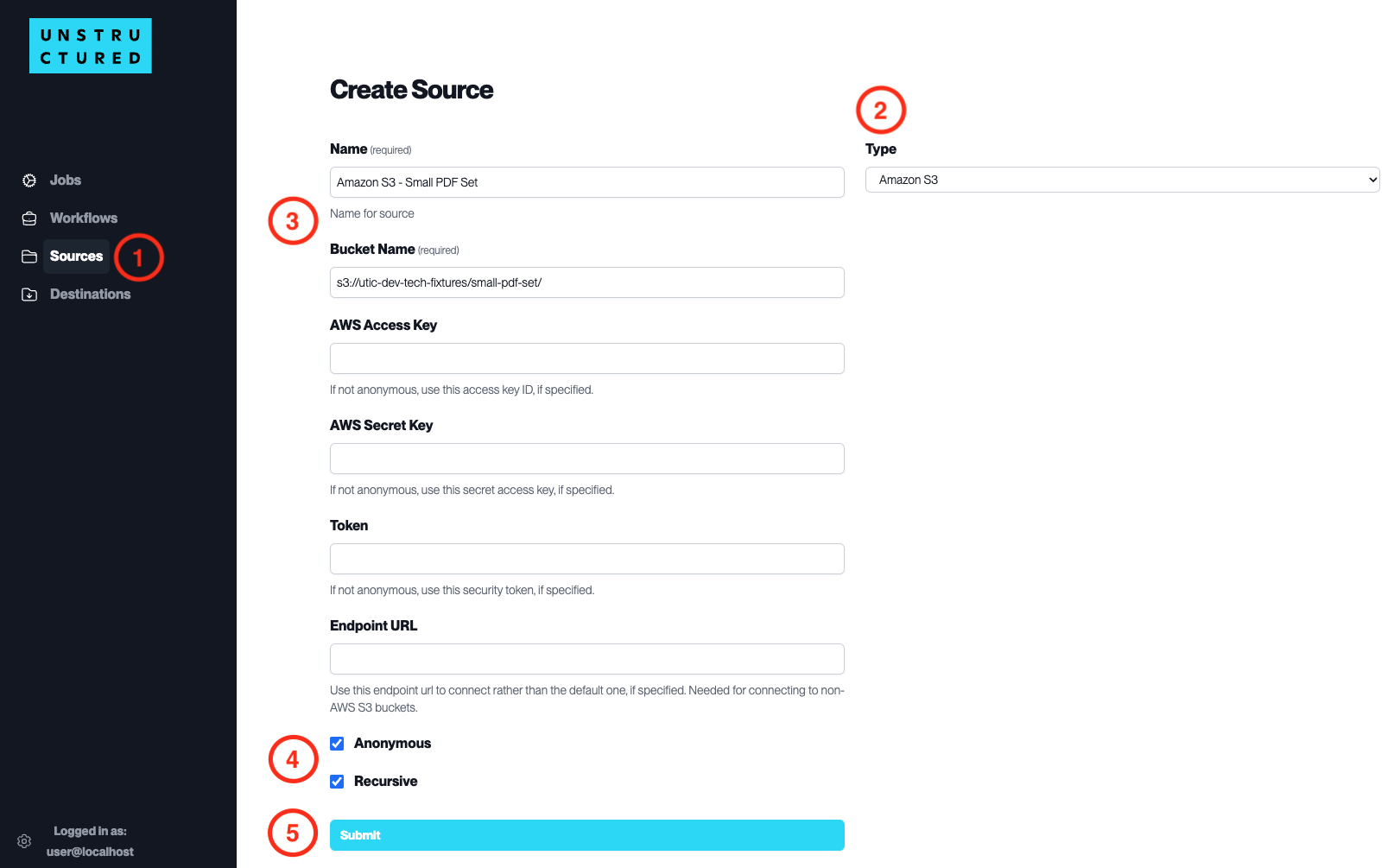
- Access the Create Source Page. Navigate to the “Sources” section on the left sidebar and click the “New Source” button.
-
Select Source Type. Select Amazon S3 from the
Typedropdown menu. - Configure Source Details to connect to the AWS Platform
-
Name(required): Enter a unique name for your source to identify it within the platform. -
Bucket Name(required): Provide the name of your Amazon S3 bucket. -
AWS Access Key: Enter your AWS access key ID if your bucket is private. Leave blank if anonymous access is configured. -
AWS Secret Key: Enter your AWS secret access key corresponding to the above access key ID. -
Token: If required, enter the security token for temporary access. -
Endpoint URL: Specify a custom URL if you connect to a non-AWS S3 bucket.
- Additional Settings
-
Check
Anonymousif you are connecting to a bucket with public access and don’t want to associate the connection with your account. -
Check
Recursiveif you want the platform to ingest data from sub-folders within the bucket.
- Submit. After filling in the necessary information, click ‘Submit’ to create the Source Connector. The newly completed connector will be listed on the Sources dashboard.