

Prerequisites
- Google Account
- Google Drive Folders and Files
- Service Account Key with permissions to access the Google Drive
Step-by-Step Guide
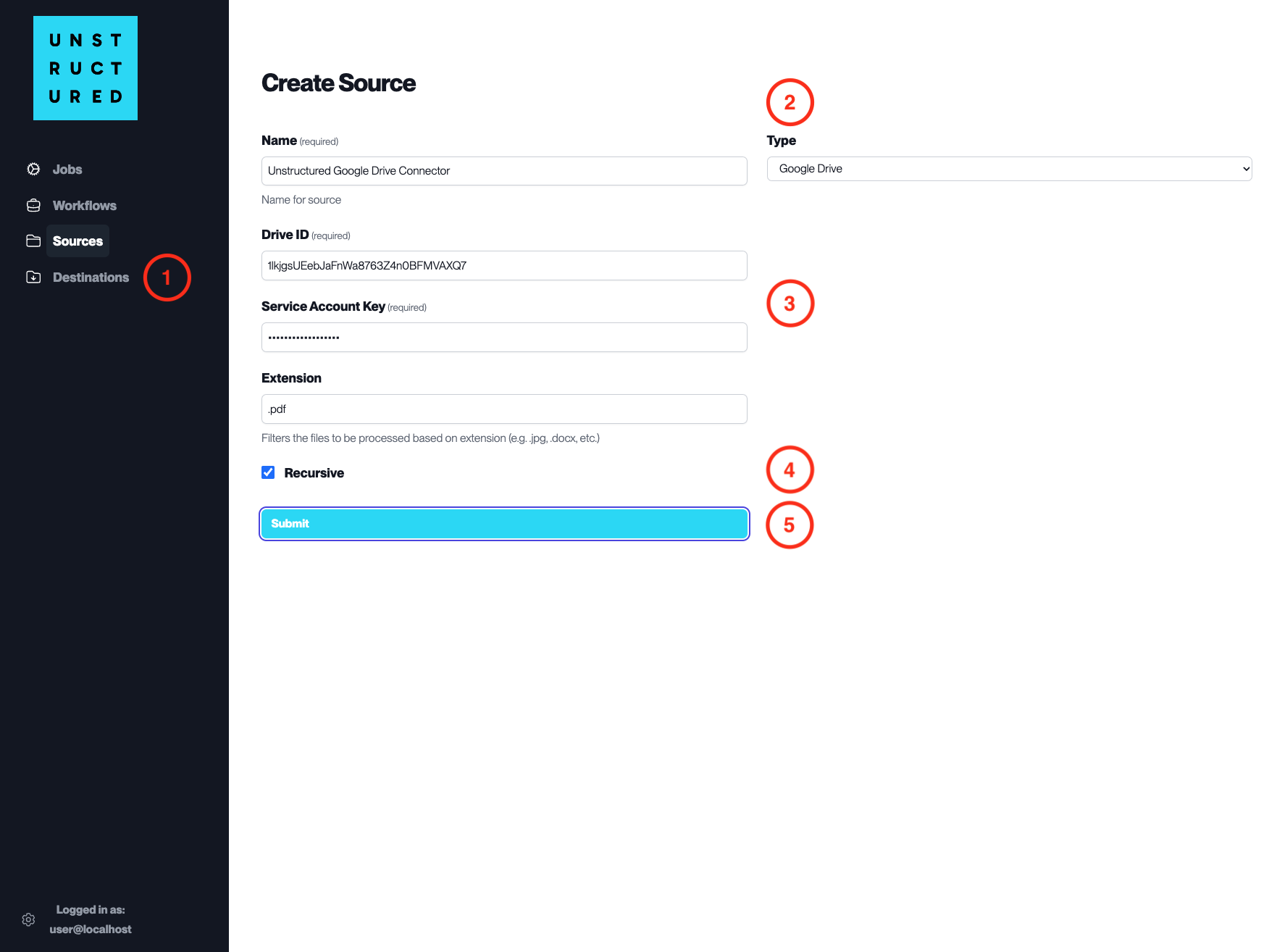
- Access the Create Source Page. Navigate to the “Sources” section on the left sidebar and click the “New Source” button.
-
Select Source Type. Select Google Drive from the
Typedropdown menu. - Configure Source Details to connect to Google Drive
-
Name(required): Enter a unique name for the Google Drive source connector. -
Drive ID(required): Input the Drive ID associated with the Google Drive you wish to connect. -
Service Account Key(required): Provide the Service Account Key that has been granted access to the specified Google Drive. -
Extension: Specify the file extensions to be included in the ingestion process, if filtering is required.
- Additional Settings
- Check
Recursiveif you want the platform to recursively ingest files from sub-folders within the specified Google Drive.
- Submit. After filling in the necessary information, click ‘Submit’ to create the Source Connector. The newly completed Google Drive connector will be listed on the Sources dashboard.