

Prerequisites
- Salesforce Account
- Salesforce categories (objects) you wish to access
- Consumer Key and Private Key (PEM) from Salesforce connected app
Step-by-Step Guide
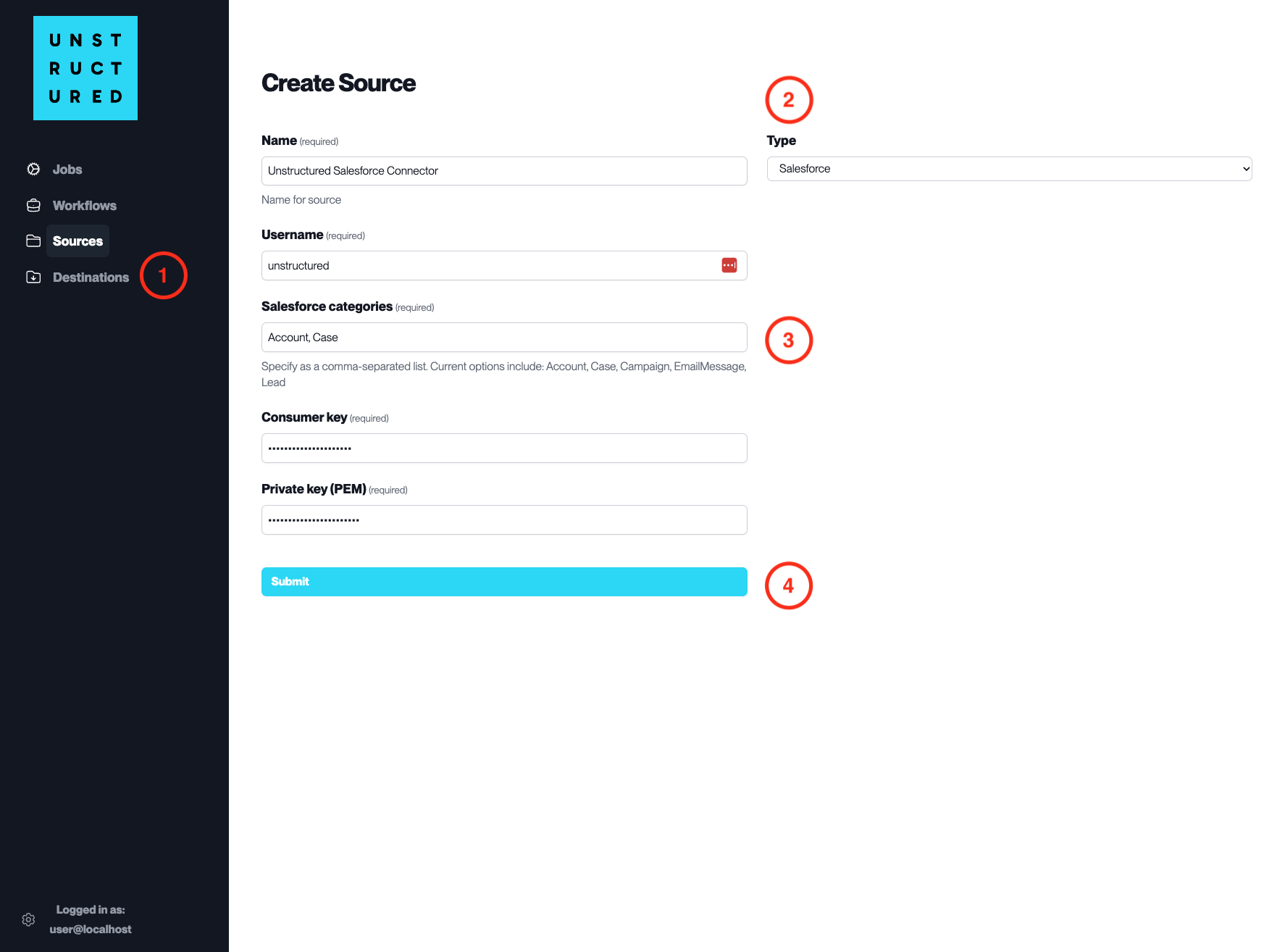
- Access the Create Source Page. Navigate to the “Sources” section on the left sidebar and click the “New Source” button.
-
Select Source Type. Select Salesforce from the
Typedropdown menu. - Configure Source Details to connect to Salesforce
-
Name(required): Enter a unique name for the Salesforce source connector. -
Username(required): Enter the Salesforce username that has access to the required Salesforce categories. -
Salesforce categories(required): Specify the Salesforce objects you wish to access, such as Account, Case, etc. -
Consumer Key(required): Provide the Consumer Key from the Salesforce connected app. -
Private Key (PEM)(required): Input the Private Key associated with the Consumer Key for the Salesforce connected app.- Note: PEM begins with “—–BEGIN RSA PRIVATE KEY—–“ and ends with “—–END RSA PRIVATE KEY—–“.
- Submit. After filling in the necessary information, click ‘Submit’ to create the Source Connector. The newly completed Salesforce connector will be listed on the Sources dashboard.