

Prerequisites
- OpenSearch Hosts
- Index Name
- Username and Password (if required)
- SSL configuration (if required)
Step-by-Step Guide
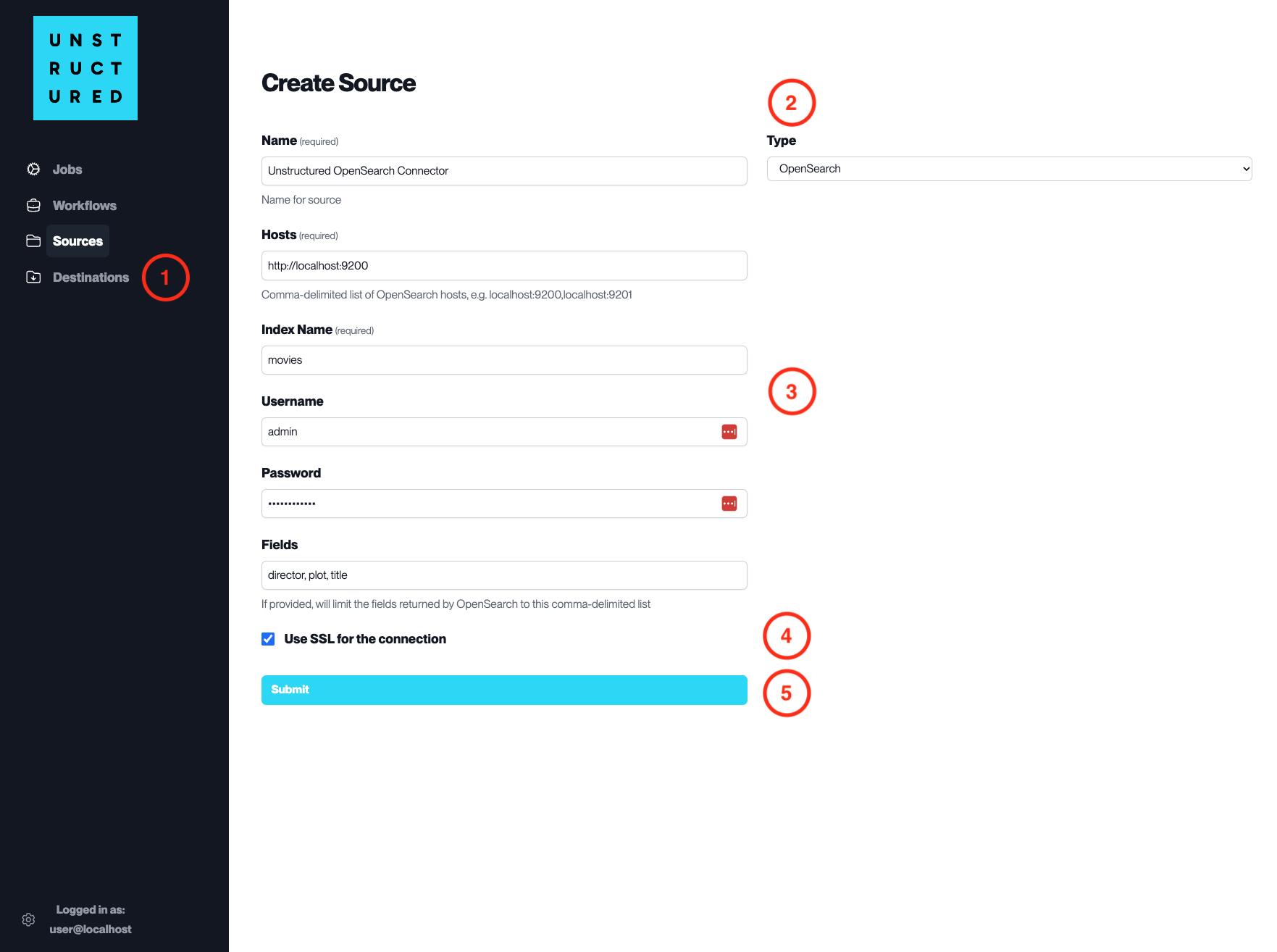
- Access the Create Source Page. Navigate to the “Sources” section on the left sidebar and click the “New Source” button.
-
Select Source Type. Select OpenSearch from the
Typedropdown menu. - Configure Source Details to connect to OpenSearch
-
Name(required): Enter a unique name for the OpenSearch source connector. -
Hosts(required): Specify the OpenSearch cluster hosts, including the protocol and port, separated by commas. -
Index Name(required): Provide the name of the index from which to start ingesting data. -
Username: Input the username for the OpenSearch cluster if authentication is enabled. -
Password: Enter the password associated with the username for the OpenSearch cluster. -
Fields: List the specific fields to be ingested from the OpenSearch index, separated by commas.
- Additional Settings
- Check
Use SSL for the connectionif the OpenSearch cluster requires an SSL connection for security purposes.
- Submit. After filling in the necessary information, click ‘Submit’ to create the Source Connector. The newly completed OpenSearch connector will be listed on the Sources dashboard.