

Prerequisites
- Google Cloud Storage Bucket URL
- Service Account Key for Google Cloud Storage
Step-by-Step Guide
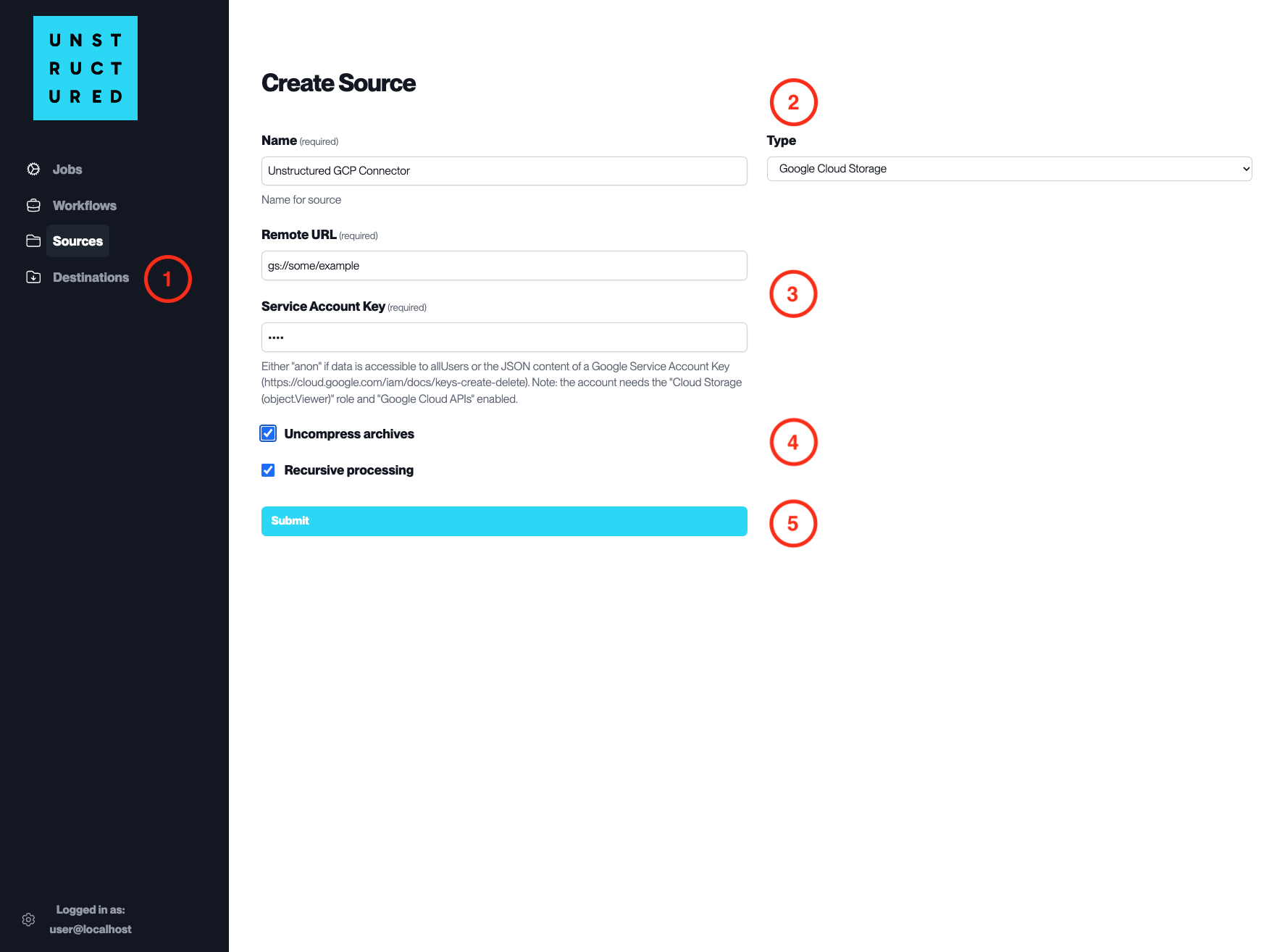
- Access the Create Source Page. Navigate to the “Sources” section on the left sidebar and click the “New Source” button.
-
Select Source Type. Select Google Cloud Storage from the
Typedropdown menu. - Configure Source Details to connect to Google Cloud Storage
-
Name(required): Enter a unique name for the Google Cloud Storage source connector. -
Remote URL(required): Specify the gs:// URL pointing to your Google Cloud Storage bucket and path. -
Service Account Key(required): Enter the JSON content of a Google Service Account Key that has the necessary permissions to access the specified bucket.- Note: the
Service Account Keymust have the Storage Object Viewer role at minimum to ensure proper access permissions. Please refer to GCS IAM documentation.
- Note: the
- Additional Settings
-
Check
Uncompress archivesif the data to be ingested is compressed and requires uncompression. -
Check
Recursive processingif you want the platform to ingest data recursively from sub-folders within the bucket.
- Submit. After filling in the necessary information, click ‘Submit’ to create the Source Connector. The newly completed Google Cloud Storage connector will be listed on the Sources dashboard.